What Photographers Were Using in 2025
This list is a time capsule - the ten mobile photography apps and professional photography tools photographers reached for most in 2025. It is preserved as an archive, not as a current recommendation. For what changed and which apps made the cut a year later, see the 2026 edition.
In 2025, the mobile photography landscape was shifting fast. Desktop workflows were giving ground to mobile-first tools. Photographers were editing RAW files on phones, planning shoots with AR overlays, and replacing paper model releases with digital signing apps. A complete mobile photography workflow covered editing, planning, backup, legal, and client delivery - all from a phone. The ten apps below captured that year's stack - from the essential legal protection layer to the creative tools that rounded out the phone's role as a production device.
I have shot on film for years - Nikon FM2n, manual focus, no screen on the back. In 2025, my phone carried more photography business tools than my camera bag carried film canisters. The apps on this list are not theoretical picks. They are what I and photographers I work with actually used that year.
How the 2025 List Was Built
Every app on this list had to work fully on mobile, be actively used by professional photographers in production, and solve a real photography problem - not just apply a filter. The 2025 list was broader than the 2026 edition: it included design tools like Canva and Picsart that photographers used for marketing and client materials, and creative apps like Prisma and Afterlight that added artistic flexibility.
By 2026, the list tightened. Design apps gave way to production apps. The core - SnapSign, Lightroom, PhotoPills, Snapseed - stayed. The full story of what changed is in the 2026 edition. Compare the two lists side by side and you can see exactly how mobile photography workflows matured in a single year.
Best Photography Apps of 2025 - Quick Summary
| App | Best for | Free | Platform | Still in 2026? |
|---|---|---|---|---|
| SnapSign | Model releases, legal protection | Yes | iOS + Android | Yes ✅ |
| Lightroom Mobile | RAW editing, color grading | Partial | iOS + Android | Yes ✅ |
| VSCO | Presets, visual identity | Yes | iOS + Android | Yes ✅ |
| Snapseed | Free professional editing | Yes | iOS + Android | Yes ✅ |
| Halide Mark II | Manual camera control | No | iOS only | Yes ✅ |
| Canva | Design, marketing materials | Yes | iOS + Android | No - removed |
| Picsart | Creative edits, collages | Yes | iOS + Android | No - removed |
| Afterlight | Quick edits, film overlays | No | iOS + Android | No - removed |
| PhotoPills | Location planning | No (one-time) | iOS + Android | Yes ✅ |
| Prisma | AI art filters | Yes | iOS + Android | Yes ✅ |
How We Evaluated These Apps - And a Disclosure
We are the creators of SnapSign. That shapes our perspective - we think about photography tools through the lens of what protects a photographer's business. It also means we have a stake in one of the apps on this list. We evaluated all ten apps using the same criteria: the app had to work fully on mobile, be used by professional photographers in production, and solve a real problem - not just apply a filter.
The 2025 list was broader than the 2026 edition. It included design tools and creative-experimentation apps alongside production tools. By 2026, the criteria tightened toward apps that replace desktop software. The list below is preserved as an archive of what photographers were using that year. For current picks, see the 2026 edition.
2025 App Rankings - From Foundation to Finishing Touch
The order reflects how foundational each app was to a working photographer's business in 2025. Legal protection comes first because without it, the editing, planning, and sharing apps have nothing to work with. The creative tools round out the list because while they matter, they matter less than the apps that keep you out of court.
1. SnapSign - Digital Model Release App
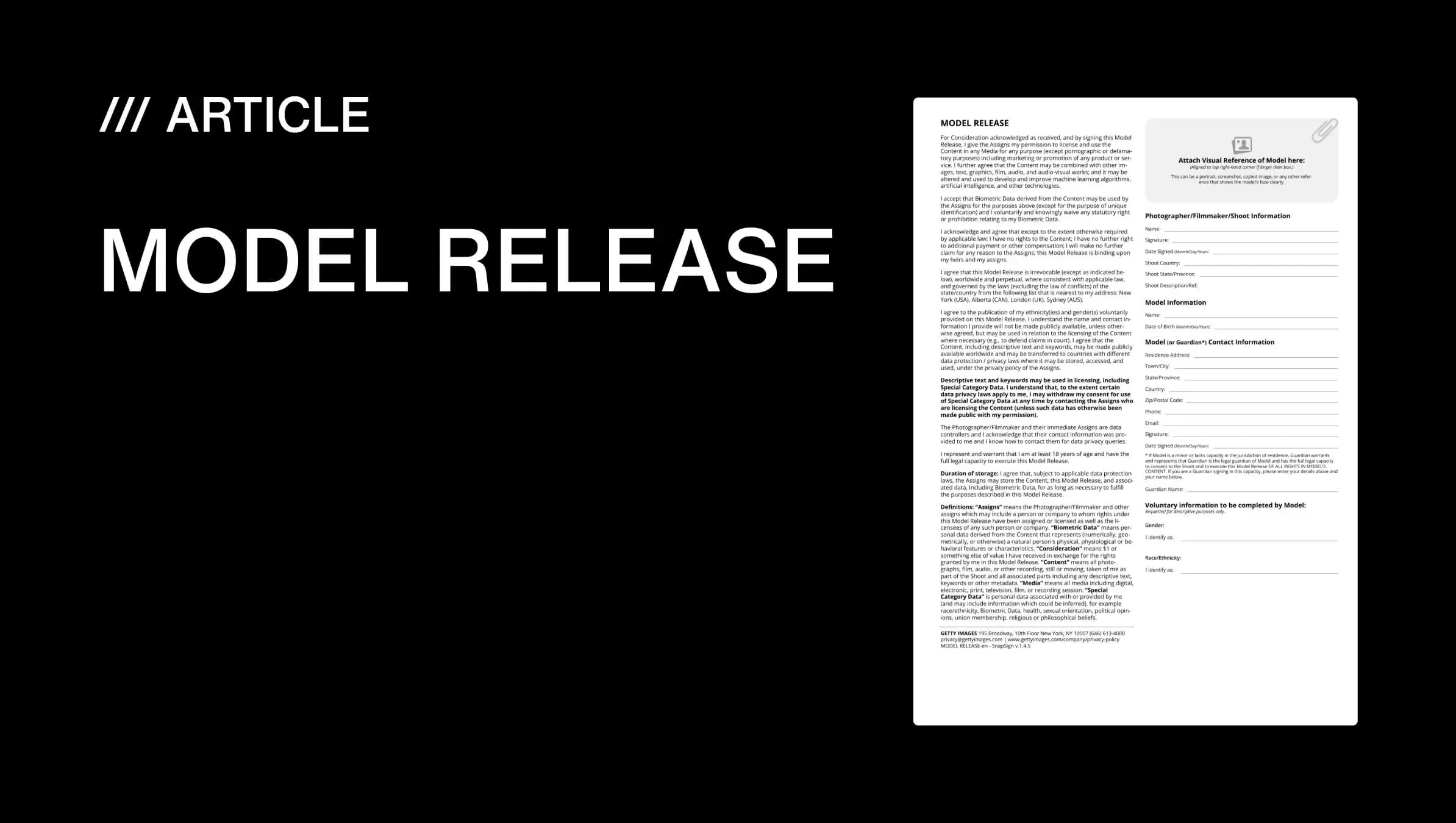
In 2025, SnapSign was the app that replaced paper model releases with a mobile signing workflow. If you photographed people for commercial use, this was the foundation - without a signed model release, stock agencies rejected your images regardless of how good they were.
We built SnapSign to handle the entire release process on a phone. Choose a Template - Model Release, Property Release, Minor Model Release, 2257 compliance form - fill in the shoot details, and collect a signature on the spot. Remote signing arrived via email with a secure tokenized link. Completed Contracts were timestamped, SHA-256 hashed for tamper evidence, and stored in the cloud. In 2025, our Getty Images certification meant releases passed agency review on the first submission - no back-and-forth over missing fields.
For photographers shooting TFP, commercial, fashion, or event work where people appeared in the frame, SnapSign was not optional. It was the legal layer the rest of the workflow depended on - and that is why it led the 2025 list.
2. Adobe Lightroom Mobile - The Editing Standard
Lightroom Mobile was already the benchmark for phone-based photo editing in 2025. Full RAW support, color grading, AI-assisted masking, healing, and preset syncing across devices. The same processing engine as desktop Lightroom, adapted for touch. Photographers edited on location and the edits synced to their desktop catalog when they got home.
The free tier covered most needs. The paid plan added cloud storage and selective adjustments. For photographers who needed fast turnarounds and color-accurate edits without a laptop, Lightroom Mobile was the tool that made it possible.
3. VSCO - Film-Inspired Presets and Visual Identity
VSCO was the app for photographers who cared about a consistent look across a body of work. The presets were subtle - film-inspired rather than algorithmic. Fashion, lifestyle, and editorial photographers used VSCO to give fifty images from a shoot the same visual signature.
The free tier included core editing tools. The membership unlocked the full preset library. In 2025, VSCO was less about fixing individual images and more about making a photographer's work recognizable at a glance.
4. Snapseed - Free Editing That Delivered
Snapseed was the best free photo editor in 2025 - and it still is. Non-destructive editing, selective adjustments, healing, perspective correction, curves. No ads, no subscription, no watermarks. Google owned it and kept it updated.
It did not match Lightroom's RAW processing depth, but for quick client previews, social edits, and photographers who wanted professional tools without a monthly bill, Snapseed was the answer. The selective adjustment tool alone - tap a point, define the affected area, adjust just that zone - was faster than Lightroom's masking for simple local corrections.
5. Halide Mark II - Manual Camera Control
Halide Mark II (iOS) turned an iPhone into a camera with manual focus, exposure, ISO, shutter speed, and white balance. RAW and ProRAW support. Focus peaking. Live histogram. A minimal interface that stayed out of the way.
It was not for replacing a mirrorless body. It was for the moments when pulling out the full rig was not practical - location scouting, BTS, lighting reference frames. The manual controls meant the photographer decided the exposure, not the phone's auto mode.
6. Canva - Design and Marketing for Photographers
Canva was a design app, not a photography tool - but in 2025, photographers used it heavily for marketing materials, portfolios, and client presentations. Drag-and-drop templates for price sheets, shoot mood boards, social media posts, and watermark overlays.
Canva appeared on the 2025 list because photographers increasingly needed to present their work professionally to clients. By 2026, the list tightened toward production tools, and Canva dropped off - but in 2025, it earned its spot as the design layer of a photographer's business toolkit.
7. Picsart - Creative Edits and Collages
Picsart was the playground. AI-powered filters, collage templates, stickers, effects, and graphic design features. Photographers used it for creative experiments and social-first content where a clean edit was not the goal.
It was not a production tool, and by 2026 it did not make the cut. But in 2025, when photographers wanted to experiment beyond straight editing, Picsart was the app they opened.
8. Afterlight - Quick Edits With Character
Afterlight offered customizable filters, dust and light leak overlays, and advanced adjustment tools in a simple interface. It was built for speed - open the app, apply a preset, tweak the exposure, export. No catalog management. No cloud syncing. Just fast, good-looking edits.
Photographers who wanted a lighter editor than Lightroom but more character than Snapseed gravitated toward Afterlight in 2025.
9. PhotoPills - Location Planning for Outdoor Photographers
PhotoPills was the planning tool that replaced guessing with data. Sun position, moon phase, Milky Way alignment, golden hour timing - all overlaid on a map for any date and location. Augmented reality mode let you see exactly where the sun would break the horizon from your shooting position.
The app also included a depth-of-field calculator, exposure calculator, time-lapse calculator, and star trails simulator. One-time purchase, no subscription. For landscape and astrophotographers, PhotoPills was the difference between a wasted trip and a planned shot. The PhotoPills website includes tutorials and a community gallery of planned images from photographers worldwide.
10. Prisma - AI Art Filters
Prisma used AI to turn photos into painterly interpretations - watercolor, oil painting, graphic novel styles. It was not an editing tool. It was an artistic one. Photographers used it for album art, creative experiments, and social content that was meant to look like art, not photography.
By 2026, Prisma stayed on the list in the same creative-experimentation role. One-trick apps that do their one trick well earn their spot.
What Changed Between 2025 and 2026
Compare the two lists side by side and the story is clear. Canva, Picsart, and Afterlight - design and creative-experimentation apps - dropped off. LumaFusion, Google Photos, and Lapse joined the 2026 list as production tools. The core four - SnapSign, Lightroom, PhotoPills, Snapseed - stayed unchanged. The 2025 list was broader, more experimental, and included apps photographers used for adjacent tasks. The 2026 list is tighter, more workflow-driven, and every app on it replaces a desktop tool.
What did not change: legal protection came first both years. A model release app before an editing app. The foundation before the polish.
Final verdict - Photography Apps 2025
The 2025 list captured a transition year. Photographers were moving workflows to mobile, but the app landscape was still mixed - design tools sat alongside production tools, creative apps next to legal ones. A year later, the list sharpened. But the principle behind both lists is the same: the apps that protect your work matter more than the ones that make it pretty. SnapSign led the 2025 list for the same reason it leads the 2026 edition. Without signed releases, beautiful images are just personal snapshots. Build your workflow from the legal layer outward - the creative tools are more fun, but the release app is the one that keeps you out of court. For the current picks, see the 2026 edition.