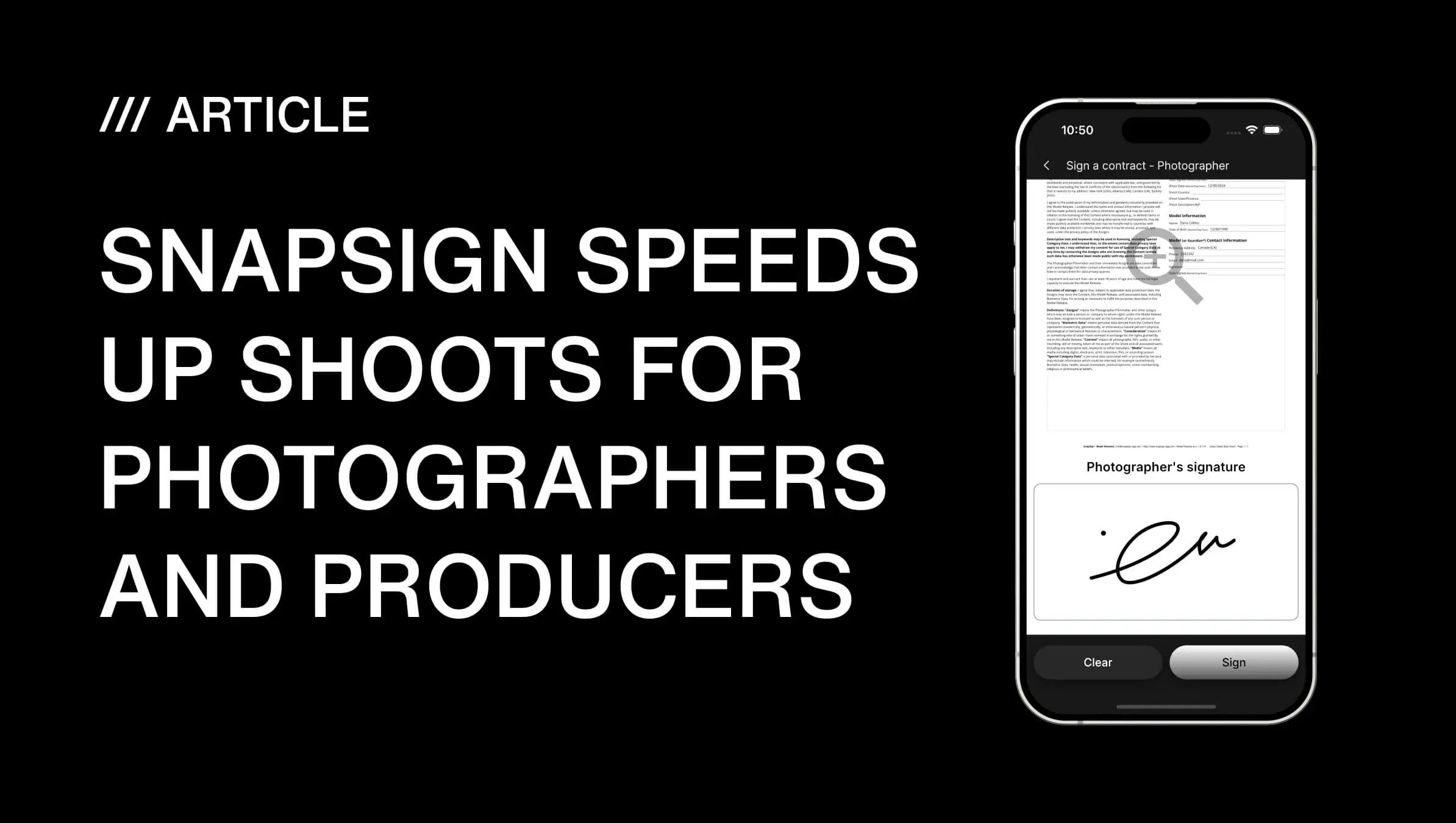
What Are SnapSign Group Events?
Managing releases for one participant is easy. Managing them for fifty people — each with a different role, a different contract type, and a different arrival time — is a completely different problem. You are not just sending contracts. You are running event registration, participant management, and consent management in parallel while also trying to light a set.
SnapSign Group Events solve exactly that workflow. A Group Event is how we handle shoots with multiple participants — one group release form workflow that replaces a dozen individual contracts. You create a single event, set up rosters for your models, creators, and property owners, and each person signs their own model release. Every signature is tracked from one dashboard.
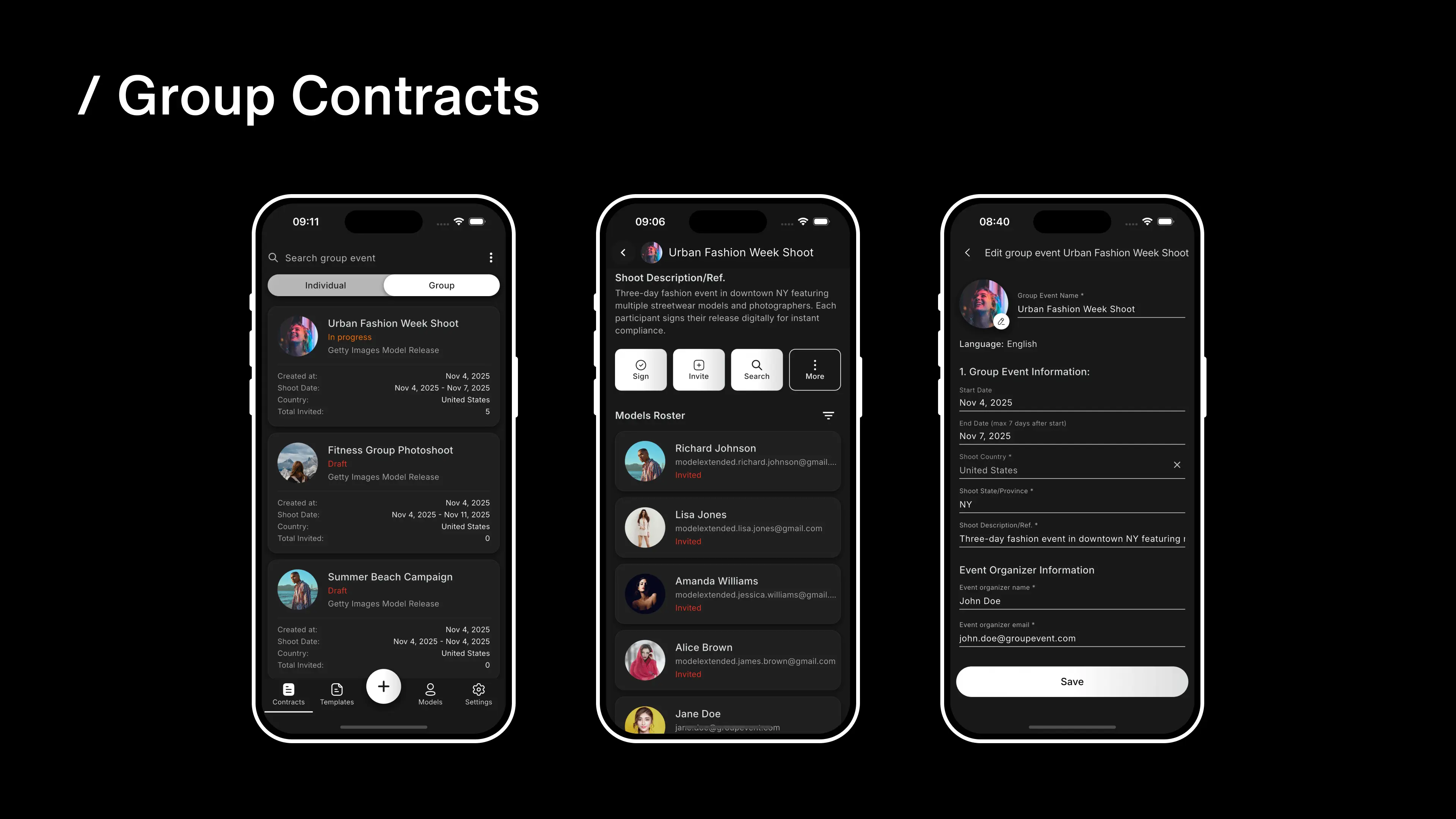
We built Group Events because the alternative — sending the same contract to thirty people one at a time, cross-referencing email threads, and guessing who has actually signed — is the kind of admin work that kills a shoot day before it starts. One link, multiple signers, zero paperwork. For a deeper look at why group releases matter legally — not just logistically — see our guide on why group model releases matter and how to handle them professionally.
Built for how real shoots work
Group Events are not a generic bulk-send feature bolted onto an e-signature tool. They are purpose-built for photography and film production workflows. Models sign model release contracts. Creators sign what production crews usually call a talent release form or crew release form — often built from a talent release form template so the wording and fields are already locked in — covering a creator’s own likeness and contribution. Property owners sign property releases — the same release types that stock platforms like Getty Images require for commercial submissions. Each roster gets the right document automatically — you do not configure templates per person, you just pick the roster type and the app handles the rest.
This matters because a fashion show with twenty models, three makeup artists, and a venue owner is not three separate workflows. It is one shoot. Group Events treat it that way.
What Goes Wrong When You Sign Everyone One at a Time
Every photographer who has run a group shoot knows the drill. You print a stack of paper releases. Half the models fill them out wrong. Someone leaves early without signing. You spend the next three days in your inbox — forwarding PDFs, checking attachment names, and sending “just following up” emails to people who already signed but used a different email address than the one you sent to. The ASMP recommends keeping signed releases organized and accessible for the life of the usage license — a standard that falls apart the moment you are juggling paper forms across a dozen participants.
Digital releases fix the paper problem, but most apps just digitize the same broken workflow: create contract, send to one person, repeat. Twenty models means twenty identical contracts, twenty separate email threads, and twenty statuses to track across a list that does not group them by shoot. Easy Release — our most direct competitor — has no equivalent to Group Events, which means anyone shooting with more than a handful of participants is stuck doing individual contracts no matter which alternative they pick.
The real cost is not the time spent sending contracts. It is the mental overhead — the low-grade anxiety of not knowing whether your paperwork is complete while you are trying to light a set, direct talent, or troubleshoot a wardrobe issue. Group Events replace that overhead with a single screen that tells you exactly where you stand.
How Group Events Work
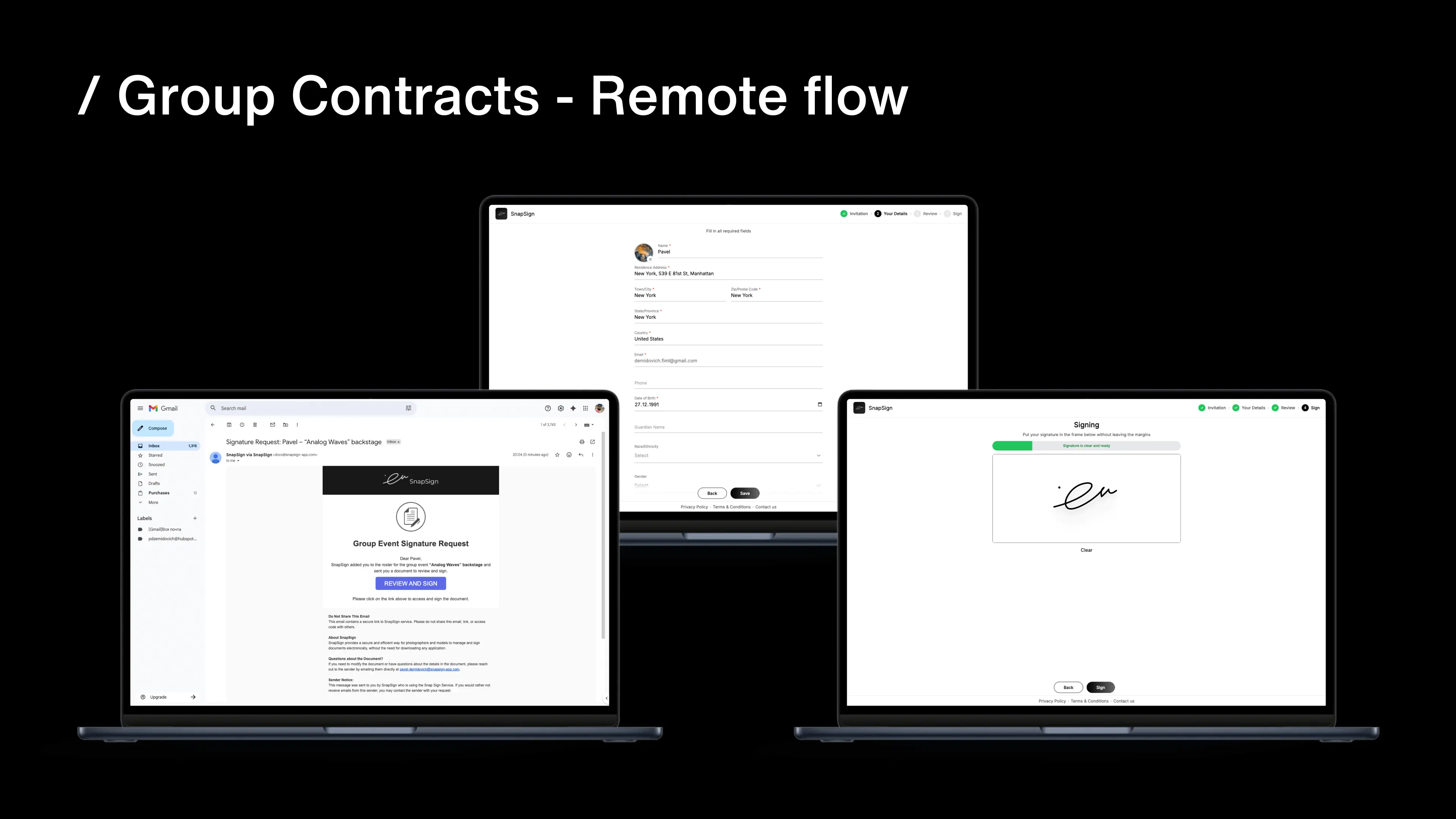
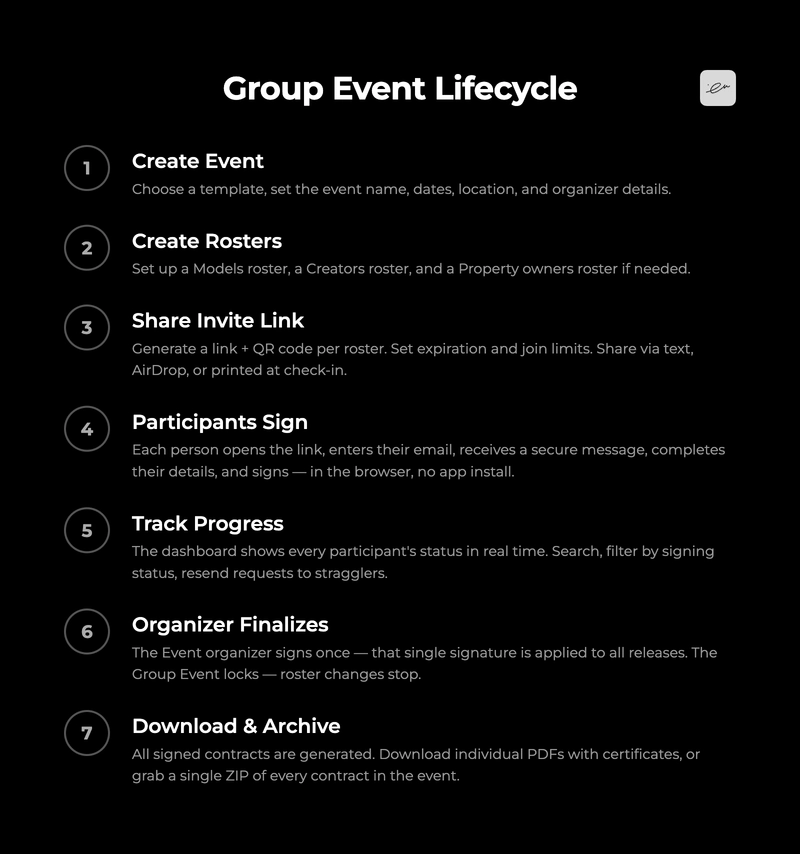
You start by choosing a template that supports Group Events, setting the event name, dates, location, and your information as Event organizer. From there, everything lives inside the Group Event screen — rosters, invitation links, signature statuses, and final release documents. If you are new to the concept, a model release is a legal document granting a photographer permission to use a person’s likeness — and Group Events make sure every person on your set has one on file. For step-by-step instructions, see our Group Events documentation.
Here is the full event lifecycle, from creation to archive:
Rosters — one list per role
A Group Event can have multiple rosters. The most common setup is a Models roster and a Creators roster. For video productions, the Creators roster typically pulls from a video release form template rather than a standard model release, since motion content carries different consent requirements. If your template includes a property or location release, you also get a Property owners roster — each participant on that roster confirms ownership or authorization details plus information about the property itself.
If no creators are added to the Creators roster, the Event organizer acts as the sole photographer — one release per model, signed by the model and the organizer. When you do add creators, the math changes: SnapSign generates individual releases for every model–creator pair. A shoot with 5 models and 3 creators produces 15 model releases — each one containing the model’s signature, the creator’s signature, and the organizer’s signature. Every creator walks away with a fully valid release covering their use of each model’s likeness.
Each roster operates independently. You can invite models before you have confirmed your full crew. You can add a property owner mid-shoot without touching the other rosters. A model who arrives late can scan a QR code and join while the rest of the roster is already signed.
To add someone manually, tap Invite, choose the roster, enter their name and email, and decide whether to send the Signature Request email immediately. When you send it right away, you can include a personal message — up to 500 characters — that the participant sees in the invitation email and on the browser welcome screen. This is useful for adding context like “please sign before call time at 9 AM” or “the gate code is 4420.”
If you add someone without sending the email immediately, they sit on the roster as pending — you can send the request later, or sign directly in the app when you are together on set.
Share a link or QR code — participants sign themselves in
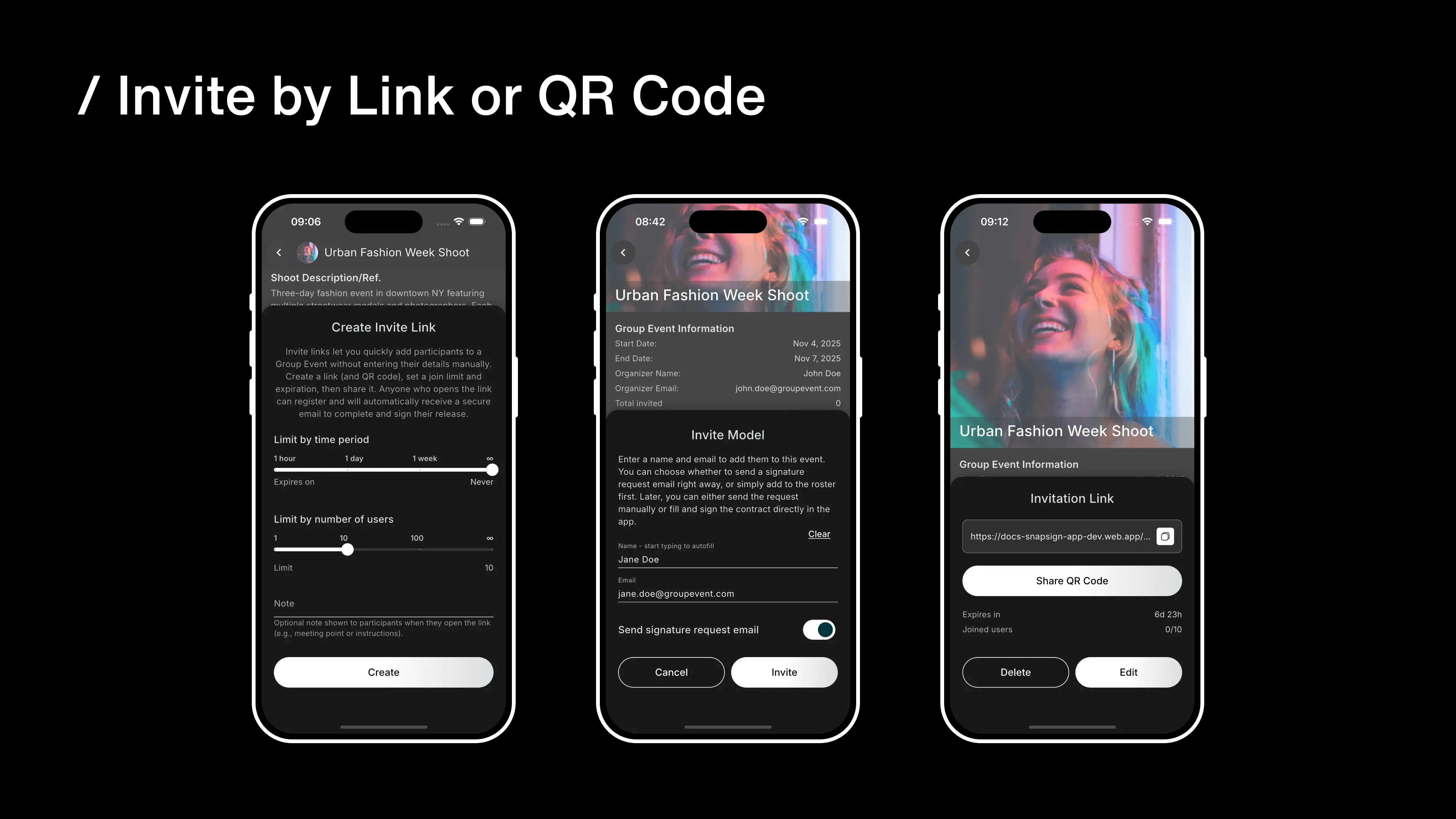
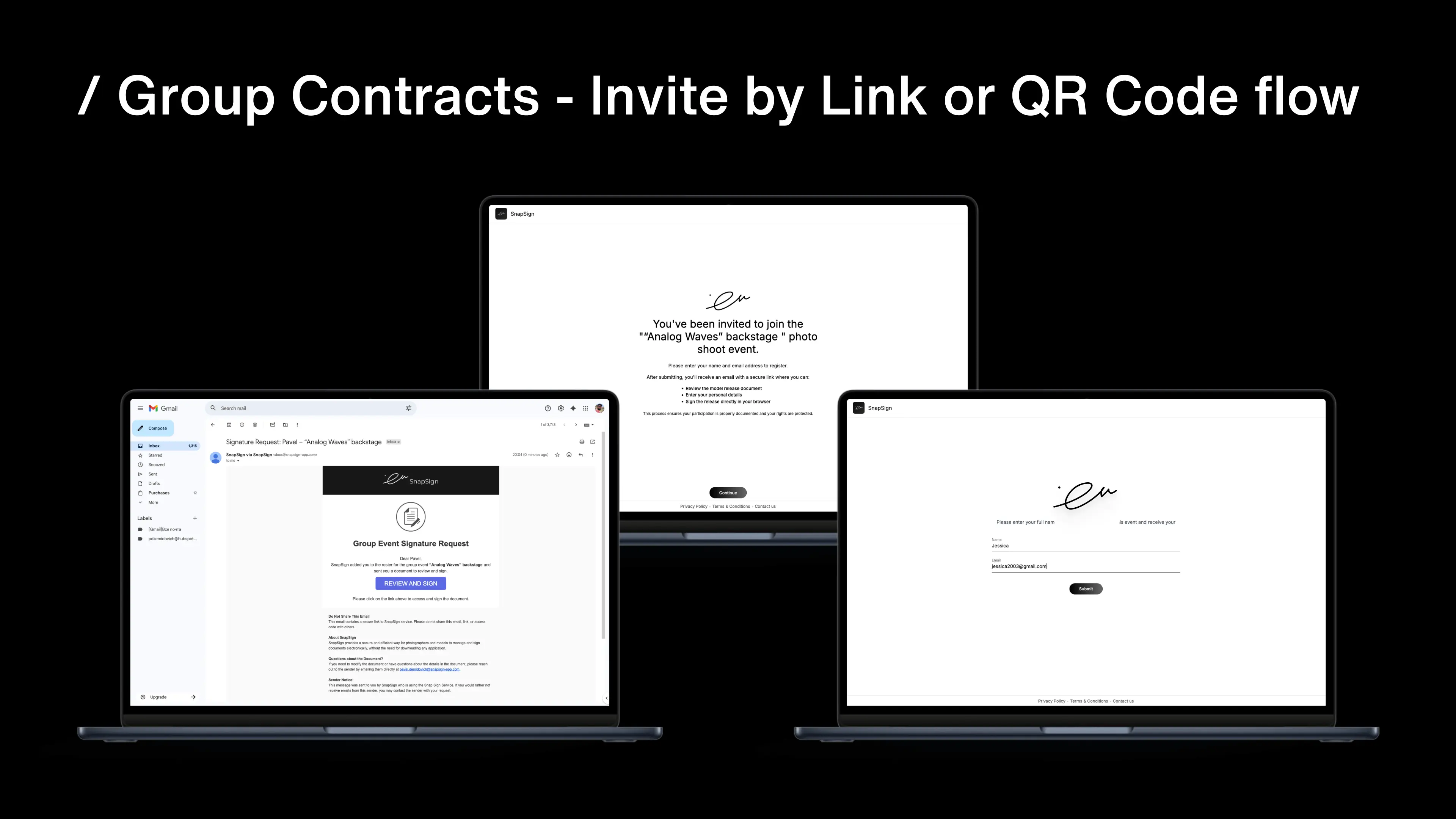
The fastest way to fill a roster is an Invitation Link. Each roster gets its own link with a QR code. You share it — by text, AirDrop, a printed sheet taped to the craft services table, whatever fits the shoot — and participants handle the rest.
Someone opens the link, enters their email address, and receives a secure email. From there, they complete their personal details and sign their contract — all in the browser, no app install required. They do not need a SnapSign account. They do not need to download anything.
| Scenario | Use individual contracts | Use Group Events |
|---|---|---|
| One model, one shoot | ✓ Straightforward | Overkill — stick with a single contract |
| Small group (3-5 people) | Doable, manageable | Saves time and gives you a single tracking view |
| Workshop or casting day (10-50+ people) | Hours of busywork, easy to lose track | One QR code, everyone self-registers, real-time status |
| Film set with cast + crew + location | Three contract types, three separate workflows | One event, three rosters, each gets the right document |
| Multi-day shoot with rolling participants | New contracts per day, manual cross-referencing | One event, add people as they arrive, QR stays live |
If someone arrives late — a replacement model, an extra crew member, a venue contact who was not on the original list — they scan the same QR code and join. The Invitation Link stays active for as long as you configured it, so late arrivals do not break your workflow.
Here is what the time difference looks like in practice for a typical production:
| Participants | Individual contracts | Group Events | Time saved |
|---|---|---|---|
| 5 | ~20 min | ~5 min | 15 min |
| 10 | ~45 min | ~8 min | 37 min |
| 20 | ~90 min | ~15 min | 75 min |
| 50 | ~4 hours | ~30 min | 3.5 hours |
Here is how the features compare between individual contracts and Group Events:
| Feature | Individual | Group Events |
|---|---|---|
| QR code signing | ✓ | ✓ |
| Remote browser signing | ✓ | ✓ |
| Unified dashboard | One per contract | ✓ All participants |
| Multiple roles per event | ✗ | ✓ Models, Creators, Property owners |
| Organizer finalization | ✗ | ✓ Locks event after sign-off |
| Bulk PDF download | ✗ | ✓ All contracts at once |
| Participant self-registration | ✗ | ✓ Via Invitation Link |
Why Group Events beat generic e-signature tools
There are other tools that offer multi-signer workflows. WeTransfer Sign lets you send a PDF to multiple people for free. BoloSign offers bulk send via CSV at $49 per month. CleverWaiver positions itself as a waiver platform for photography studios with QR code signing. These tools solve the “send to many” problem at a generic level — they handle signatures, but they do not understand what is being signed.
Group Events are different because they are built into the contract type itself. A model on the Models roster gets a model release contract. A creator on the Creators roster gets a participation consent contract. A property owner gets a property release. Generic tools treat every recipient as “a signer” who gets the same PDF. We treat every participant as a role with the right document, the right fields, and the right legal language — without you configuring it per person.
For stock photography submissions, this distinction matters. Platforms like Getty Images and Shutterstock require specific release formats. A generic e-signature PDF might collect a signature, but it will not produce a Getty-compliant model release unless you built the template yourself. Group Events produce the right release per role out of the box.
One event. Multiple rosters. Every signature tracked. No paperwork.
What You Can Control on Every Group Event
The details are where Group Events earn their place in a professional workflow. You are not just sending links into the void — you have fine-grained control over access, timing, and visibility.
Expiration and join limits on Invitation Links
Every Invitation Link has two independent controls:
- Expiration: one hour, one day, one week, or no time limit. For a half-day fashion show, set it to one day — the link dies after wrap and nobody can join after the fact. For a multi-day production, set it to one week or leave it open.
- Join limit: 1, 10, 100, or no limit. For a small creative team, cap it at 10. For an open casting call, set it to 100 or unlimited.
These are not global settings — each roster gets its own Invitation Link with its own configuration. Your Models roster can have an unlimited link open for a week while your Creators roster is capped at 5 and expires in a day. The controls are per-roster because real shoots have different requirements per group.
If you edit the link settings, the URL stays the same — everyone who already has it can still use it. If you delete the link, it stops working for anyone who has not yet joined, but participants already on the roster stay there.
Signature tracking and roster management
The Group Event dashboard shows every participant’s status across every roster. You can search by name, filter by signing status, and resend Signature Requests to anyone who has not yet completed their contract. A participant can be removed from a roster before they sign — useful when someone drops out or a replacement arrives.
Signature Request links are valid for 48 hours while unsigned. The invitation email states this limit so participants know the window. If a link expires, the signer sees a message telling them to contact the Event organizer for a new request — and you can resend from the dashboard in a few taps.
After a participant signs, the same link stays available for 30 minutes so they can view the signed contract. After that, the link shows that the contract is signed and is no longer accessible — signed documents stay in your SnapSign account, not in a public URL.
When every required participant in every roster has signed, you — as the Event organizer — review the roster one last time and sign once. That single signature is automatically applied to every individual release in the event. The Group Event locks, roster changes are no longer available, and all signed contracts are generated. You can download individual PDFs with certificates, or grab a single ZIP archive containing every signed contract in the event.
For events with creators on the roster, you can send each creator their contract package individually — a ZIP containing that creator’s personal data and signature alongside the model’s signature and your organizer signature.
Who Benefits Most from Group Events
Group Events are not for every shoot. But for the photographers and filmmakers who need them, they replace what would otherwise be hours of repetitive contract management. Here is who gets the most value:
Workshop and photo walk organizers. When you run a paid workshop with ten to thirty attendees, you need everyone to sign before the first shutter click. One QR code at check-in replaces a stack of paper forms and an hour of data entry afterward.
Wedding and event photographers. A wedding party has bridesmaids, groomsmen, parents, and sometimes vendors who all appear in commercial-use images. Sending individual model release requests to twelve people on the morning of a wedding is not realistic. One Group Event link in the wedding timeline email covers everyone.
Film and video production crews. A film set has cast, crew, and often a location owner. Each needs a different document — model releases, participation consents, and property releases. Individual contracts treat these as three separate workflows. Group Events treat them as one shoot with three rosters. For productions that span multiple days, this difference alone can save hours of admin time, as our guide on model releases for photo and video productions covers in more detail.
Casting directors and talent agencies. When you are seeing twenty models in a day, you need releases from all of them — whether that’s a standard model release or an actor release form — not just for the shoot itself, but for the casting session. A QR code at the sign-in table handles this without slowing down the flow of talent.
Fashion show and runway photographers. Backstage access means releases from designers, models, makeup artists, and venue staff — sometimes an artist release form for a live performer, sometimes a standard model release — often in a fifteen-minute window before the show starts. Invitation Links with QR codes and no app requirement are the only realistic way to get this done.
Content agencies managing multiple creators. If you represent five photographers and each has a shoot with multiple participants, Group Events keep each shoot’s paperwork separate, organized, and trackable without a shared spreadsheet or a Slack channel full of “did we get the release for the second model on Tuesday’s shoot?” messages.
When a Single Contract Makes More Sense
Group Events add structure — rosters, organizer finalization, locked events. For small, simple shoots, that structure is unnecessary overhead:
- One model, one shoot, one release. Create an individual contract. It is faster, and you get the signed PDF in fewer steps. Group Events exist to solve multi-participant complexity — do not add complexity where there is none.
- Repeat collaborations with a known model. If you shoot with the same model regularly, a Model Profile with an individual contract is the cleaner workflow. Group Events are organized around events, not ongoing relationships.
- Two or three participants with no role-based contract differences. If everyone signs the same model release and there is no property release or creator consent to track, three individual Signature Requests take about the same time as setting up a Group Event — and the individual contract dashboard is slightly simpler.
The tipping point is around four participants or two different contract types. Below that, individual contracts are fine. At or above it, Group Events start saving real time — and more importantly, they eliminate the mental overhead of tracking who signed what across multiple parallel workflows.
Before you run your first Group Event
Group Events sit at the intersection of several workflows. If you are new to any of these areas, the articles below cover the foundations:
- Model releases — what they are and why they matter — the legal foundation every release sits on.
- The complete guide to property releases — if a Group Event includes a location release, this covers the requirements.
- Why group model releases matter and how to handle them professionally — the legal and logistical reasons group releases exist.
- Model releases for photo and video productions — production-specific release workflows that Group Events streamline.
Final verdict - Group Events
Group Events solve a problem that most model release apps ignore: real shoots involve more than one person. By treating a multi-participant shoot as one workflow instead of a stack of identical contracts, Group Events eliminate the tracking, the chasing, and the uncertainty that drain time and attention from the creative work.
If you run workshops, casting days, film sets, fashion shows, or any shoot where paperwork multiplies with the headcount, Group Events are the reason to move your releases into SnapSign. Two trial events are free — enough to run a real shoot and see whether the workflow fits. For the full feature timeline, see our release notes.
Also available in: Español — Group Events para sesiones de fotos, eventos y producciones · Français — Group Events pour shootings, événements et productions